
Your simplified with AI
Stop juggling calendars. Just tell the AI what you need — 'Book a meeting with Sarah Thursday at 3 PM' — and it's done. Connects to your Google Calendar.
Google Calendar synced
Reading your availability
Meeting confirmed for Thu 3:00 PM
Key features
A scheduling assistant, not another calendar
Everything lives in one chat. Tell it what you need, and it reads and writes your Google Calendar for you.
Chat to Schedule
Just say what you need in plain English. 'Schedule a meeting tomorrow at 10 AM' or 'Find me a free slot this week' — the AI handles it.
Google Calendar Sync
Connect your Google Calendar and the AI reads/writes events directly. Everything stays in sync automatically.
Free after 11:00 AM tomorrow
Find Free Slots
Ask the AI to find when you're free. It checks your calendar and suggests the best times for your meetings.
All 3 attendees free
Thu 3:00 PM — no conflicts
Multi-Participant Meetings
Schedule meetings with multiple people. The AI finds common availability and books the best time for everyone.
Reschedule Easily
Need to move a meeting? Just tell the AI — 'Move my 3 PM to Friday' — and it handles the reschedule.
12 past conversations
Conversation History
Keep all your scheduling conversations organized. Pick up where you left off in any previous chat.
See it in action
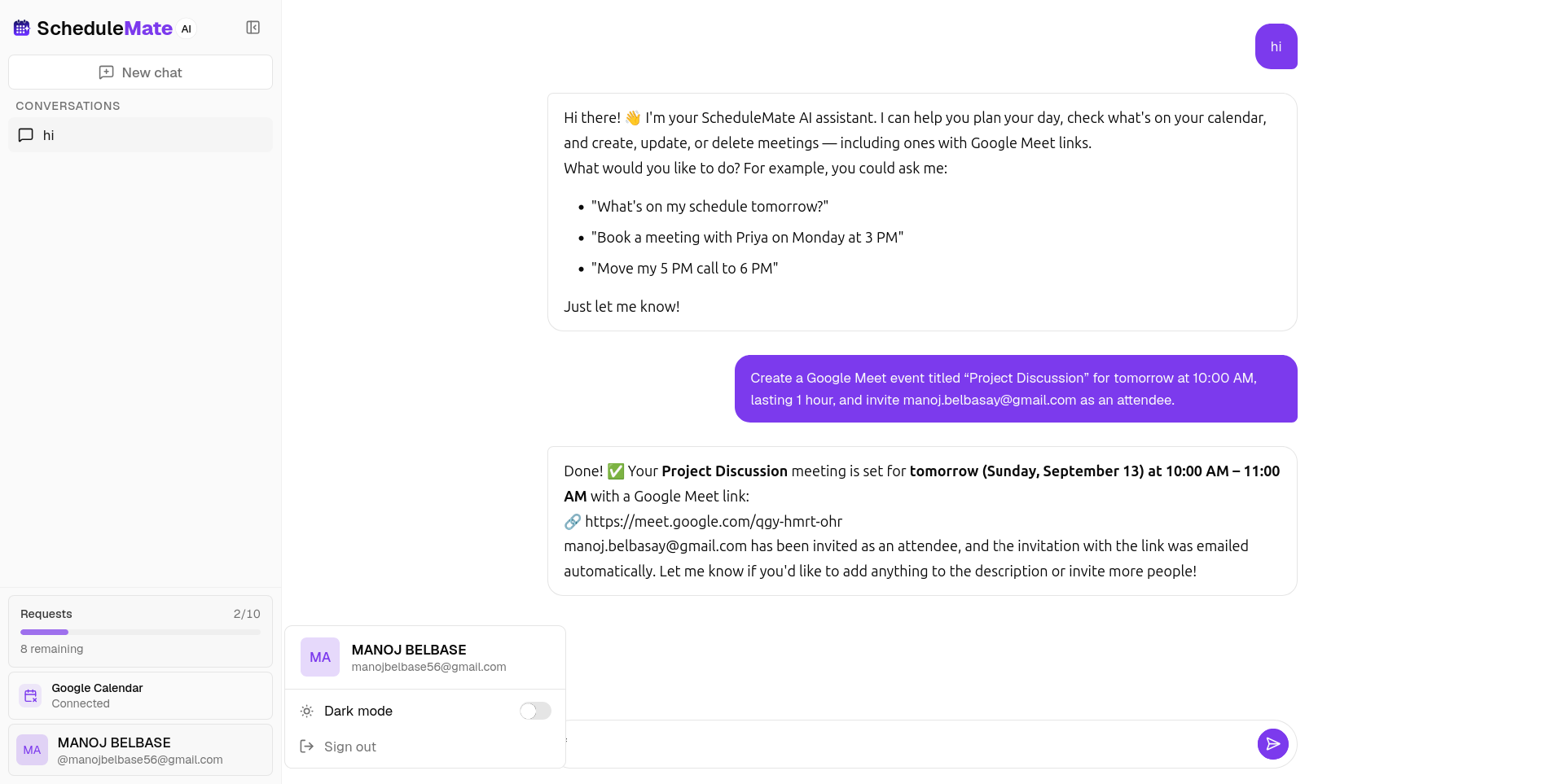
A chat that books your calendar
Real screens from the app — book a meeting from a chat message, all through your Google Calendar.
Book a meeting from a chat message
Ask for a call in plain language. ScheduleMate checks your availability, picks a slot, sends the invite, and confirms it back in the conversation.
- Natural-language booking — no form needed
- Invite sent to the attendee automatically
- Confirmed back in the chat instantly

Connected to your Google Calendar
Connect once from the sidebar. ScheduleMate can then read your availability and write new events straight into your Google Calendar.
- One-click Google sign-in, OAuth-secured
- Reads your real availability before booking
- Disconnect anytime from the sidebar

How it works
From chat to booked in three steps
From sign-up to your first AI-scheduled meeting in under 2 minutes.
Sign up with email or Google
Create your free account in seconds. No credit card required.
Connect your Google Calendar
Link your Google Calendar so the AI can read your schedule and create events for you.
Chat and let AI handle it
Just tell the AI what you need. It books, reschedules, and finds free slots — all through natural conversation.
Pricing
Simple plans with room to grow
Start with a free trial, then pick the plan that fits your club — cloud sync, staff tools, and capacity as you scale.
Legend
Legend for free
Everything you need to try AI scheduling.
- 10 AI scheduling requests
- Google Calendar sync
- Multi-participant meetings
- Conversation history
- Works in any browser
Pioneer
RecommendedFor solo schedulers who want more
For busy professionals who outgrow the free plan.
- 50 AI scheduling requests
- Google Calendar sync
- Multi-participant meetings
- Conversation history
- Priority booking speed
Enterprise
For power users who want more, sooner.
- More AI requests
- Priority support
- Early feature access
- Direct feedback line
Ready to get your schedule under control?
Start free with 10 AI requests on signup. No credit card required.